Illustrative black television remotes beside a lavender display block

TVMates buying guides · UK edition

A Samsung TV remotethat fits your setup.

Compare three One For All options, from a Samsung-specific replacement to controls for four or five devices. Start with your TV model and the buttons you need to keep.

01 · Exact UK models02 · Clear trade-offs03 · Useful checks

Retailer links open external product listings. Confirm the exact model and current offer with the seller. Hero artwork is AI-generated and illustrative, not a photograph of a featured product.

Our shortlist

Samsung-compatible TV remotes compared

Compare the documented offer, practical specifications and our editorial assessment in one place.

Scoring brief: Practical suitability for replacing Samsung TV controls or consolidating compatible home-entertainment devices. See how the scores are calculated.

Source information checked Scroll to compare all details
Samsung-compatible TV remotes: editorial scores, documented offers and specifications
ProductTVMates scorePrice / offerPurpose & devicesSetup routeUseful featureExplore
One For All Samsung replacementURC4910For replacing one Samsung remote
£12.99CurrysChecked Home delivery was listed as available on 15 November 2026. Check postcode availability, any delivery charge and the complete order total.Samsung replacementDevices: 1 TVBasic use without programmingLearning function
One For All Smart Control 5URC7955For a five-device setup
View buying optionsOne For AllMulti-device controlDevices: Up to 5SimpleSet, codes or appThree Smart Activities
One For All Evolve 4URC7145For a four-device setup
View buying optionsOne For AllMulti-device controlDevices: Up to 4SimpleSet or codesLearning and two activities

These are One For All products, not Samsung-branded original remotes. Check exact-model compatibility and required functions before purchase. Two supplied destinations are manufacturer pages with buying links. The URC4910 item price was rechecked at £12.99 on 15 November 2026, with home delivery listed as available. Confirm any delivery charge; the other product information retains its original check date.

For replacing one Samsung remote
01

One For All Samsung replacement

URC4910

The direct starting point for everyday Samsung TV controls.

The URC4910 is the focused option for replacing a Samsung TV remote rather than combining an entire equipment stack. Currys describes basic operation without initial programming, with common Samsung controls and a learning function for adjustments.
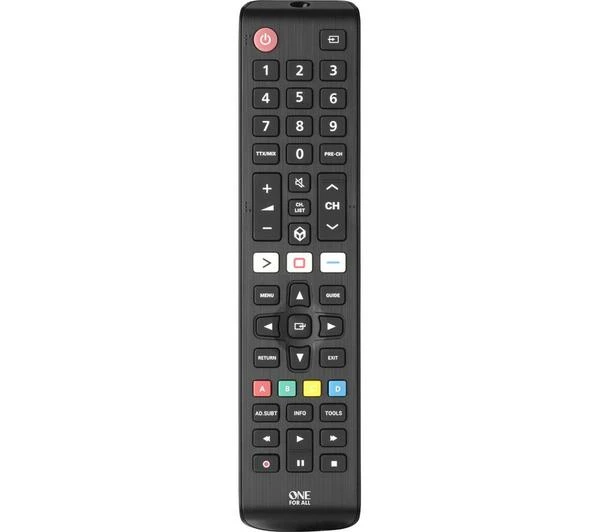
One For All Samsung replacement URC4910
Retailer / manufacturer product image
  • Samsung replacementMain purpose
  • 1 TVDevices
  • Basic use without programmingSetup route
  • Learning functionUseful feature

Overview

The URC4910 is the focused option for replacing a Samsung TV remote rather than combining an entire equipment stack. Currys describes basic operation without initial programming, with common Samsung controls and a learning function for adjustments. It takes two AAA batteries, which the listing says are not included.

The item price was rechecked at £12.99 on 15 November 2026, with home delivery listed as available. Delivery charges may apply. Check the basket total rather than comparing only the remote price. Match your television and required controls before buying. A familiar button layout does not establish support for every microphone or Bluetooth function of a Samsung original.

Choose this model around the commands you use every day: power, volume, input selection and navigation. If your main frustration is a missing handset, its focused layout can be more relevant than extra device slots. A household that also wants to combine separate audio and set-top-box controls has a different reason to consider the multi-device models.

Key details

One For All Samsung replacement specifications
Checked price£12.99
Main purposeSamsung replacement
Devices1 TV
Setup routeBasic use without programming
Useful featureLearning function
Buying routeCurrys

Reasons to choose

  • Focused Samsung replacement layout
  • Learning support for compatible extra commands

Things to consider

  • Do not assume voice, Bluetooth or every original shortcut is reproduced. Batteries are extra.

Sources: Currys product information. Specification and offer information checked .

For a five-device setup
02

One For All Smart Control 5

URC7955

Organise several compatible devices around how you watch.

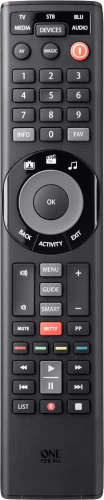
Smart Control 5 is aimed at a setup with more than a television. The manufacturer lists compatible TV, set-top box, disc player, audio and media equipment.

One For All Smart Control 5 URC7955
Retailer / manufacturer product image
  • Multi-device controlMain purpose
  • Up to 5Devices
  • SimpleSet, codes or appSetup route
  • Three Smart ActivitiesUseful feature

Overview

Smart Control 5 is aimed at a setup with more than a television. The manufacturer lists compatible TV, set-top box, disc player, audio and media equipment. Three Smart Activities combine controls so channel buttons can operate a set-top box while volume goes to an audio device.

That flexibility involves configuration. Check every component in the manufacturer's compatibility tool, not just your Samsung screen. The product page advertises app-assisted setup alongside other methods. Confirm current app availability for your phone before making it the reason to buy. The supplied destination is the manufacturer page, which provides its own buying route.

Before choosing five-device control, write down which box should respond to each command. A TV, separate receiver and set-top box can otherwise leave volume and channel controls pointing at different places. The activity feature addresses that arrangement, while the fifth device slot is only valuable if your setup actually needs it.

Key details

One For All Smart Control 5 specifications
Offer statusView buying options
Main purposeMulti-device control
DevicesUp to 5
Setup routeSimpleSet, codes or app
Useful featureThree Smart Activities
Buying routeOne For All

Reasons to choose

  • Up to five compatible devices
  • Three activities combine controls across equipment

Things to consider

  • Compatibility is device-specific. A setup app does not establish universal Bluetooth control.

Sources: One For All product information. Specification and offer information checked .

For a four-device setup
03

One For All Evolve 4

URC7145

A middle route between one replacement and a larger system.

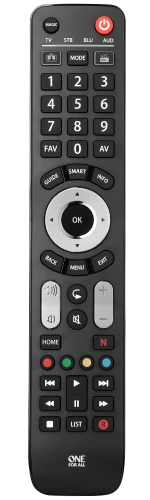
Evolve 4 supports up to four compatible devices, with a keypad aimed at smart-TV use. One For All lists a NetTV key, learning support and two activities for watching television or a film.

One For All Evolve 4 URC7145
Retailer / manufacturer product image
  • Multi-device controlMain purpose
  • Up to 4Devices
  • SimpleSet or codesSetup route
  • Learning and two activitiesUseful feature

Overview

Evolve 4 supports up to four compatible devices, with a keypad aimed at smart-TV use. One For All lists a NetTV key, learning support and two activities for watching television or a film. Its wide-angle infrared design can make aiming less fussy, though the equipment still needs a suitable signal path.

Consider it when four device slots are enough and you prefer to configure the remote directly. Check the exact TV, set-top box and audio models before choosing. The manufacturer page is the supplied destination and contains a buying link. No current retailer price is assumed for this entry.

Map your equipment against the four available slots before paying for more capacity. A television, set-top box, disc player and audio device would use the complete allocation. Its two activities can simplify that arrangement, but check whether an essential original control depends on a command type this infrared remote does not reproduce.

Key details

One For All Evolve 4 specifications
Offer statusView buying options
Main purposeMulti-device control
DevicesUp to 4
Setup routeSimpleSet or codes
Useful featureLearning and two activities
Buying routeOne For All

Reasons to choose

  • Four device slots and learning support
  • Two activities for combined TV and film controls

Things to consider

  • Infrared does not guarantee control through a closed cupboard or support for Bluetooth-only commands.

Sources: One For All product information. Specification and offer information checked .

05 / The buying advice

Look past
the box.

The details that make a difference after your purchase arrives.

One For All Samsung replacement
Model fitUseful featuresComplete offer
01

Find the full TV model

Read the model label or information screen in the television's settings. A series nickname is less useful than the complete identifier. Keep the original remote code too if you have it.

02

List the functions you need

Power, volume and input selection are only the beginning. Check app shortcuts, programme guides, menus and microphone functions separately. Basic compatibility may leave out a favourite feature.

03

Count devices first

A TV, set-top box, disc player and soundbar already use four slots. Decide which components need to share the remote, then check each model individually.

04

Understand learning

Learning can copy supported infrared commands from a working original remote. If it is lost or broken, do not assume learning can recover a missing command. Check the built-in codes and support options.

05

Test the complete routine

After configuration, try power, input switching and volume routing in each activity. Check that everyone using the television understands the controls before putting the original remotes away.

06

Keep setup practical

For a replacement remote, check the battery type and keep the setup instructions somewhere easy to find. For a television, plan access to cables and leave the ventilation clearance required by its manufacturer. Keep the packaging until you have checked the item and its accessories.

06 / Behind the guide

Clear about
what we know.

The product facts and offers retain their source-check dates beside each review. The expanded assessments and scores were added on 15 November 2026. They explain how the documented features and purchase conditions fit this guide’s intended use.

These are research-based editorial assessments. We have not carried out hands-on testing, laboratory measurements or independent compatibility and load testing. The scores do not establish measured performance or long-term reliability.

Research method

Published specificationsSource-linked offersEditorial assessment

How to use the evidence

The scores assess this buying brief: Practical suitability for replacing Samsung TV controls or consolidating compatible home-entertainment devices. A higher number reflects a stronger documented fit for that brief. Similar products can receive the same score, and scores from different buying briefs should not be treated as universal rankings.

Prices and available offers can change. Match the exact model and check the seller’s current delivery and returns information before buying. Reader feedback below concerns this guide and is separate from the product scores.

Models assessedPublished product information
How we calculate the TVMates score

We award up to 10 points using the same 4 criteria for every product in this guide. Component values are editorial judgements based on the documented specifications and offer. They are not customer review averages or laboratory measurements.

On smaller screens, swipe or scroll to see each product’s score.

TVMates editorial scoring rubric for this buying brief
CriterionMaximumURC4910URC7955URC7145
Compatibility and physical fitMatch to the intended devices and required controls, including documented setup and connection limits.32.62.52.5
Practical featuresUseful device capacity, learning and activities for the stated control arrangement.32.42.72.5
Value and offer clarityThe recorded price and clarity of an actual UK purchase route; unavailable stock, unconfirmed prices and unclear variants reduce this component.21.81.11.2
Specification confidenceHow clearly the source describes the exact item, including missing limits or conflicting fields; this is not independent testing or a safety certification.21.61.51.5
Total score108.47.87.7

These editorial scores assess the published specifications and the offer recorded on this page. Prices and availability refer to the stated check date and may have changed. Scores are not customer-rating averages or results of hands-on performance, installation, load or reliability tests. A different variant or documented offer can change a model’s assessment.

Before you decide

A few final
questions.

Quick answers to common questions, so you can choose with confidence.

Are these official Samsung remotes?

No. All three products are made by One For All. The URC4910 is a Samsung-specific replacement, while URC7955 and URC7145 are multi-device universal remotes. Check your exact television and required functions rather than treating compatibility as original-equipment status.

Will the URC4910 work without programming?

Currys describes basic Samsung TV use after inserting batteries. Test power, volume, inputs and menus on your exact television. Additional functions may need adjustment, and the description does not establish that every original voice or Bluetooth feature is supported.

Does Smart Control 5 control five televisions?

Its five-device capacity describes a multi-device system, not a guarantee that every combination of five TVs can be configured. Check your intended equipment mix using the compatibility tool on the Smart Control 5 page before buying.

Can I copy buttons from an old remote?

Learning can help with supported infrared commands when you have a working original remote. It cannot copy from a lost or non-functional control. Follow the new remote's procedure and confirm whether the particular command can be reproduced.

Can a universal remote use the TV's microphone features?

Do not assume it can. Ordinary TV control does not prove support for the original microphone, Bluetooth pairing or voice service. If voice control matters, confirm that exact function for both the television and the proposed replacement before ordering.

How does Evolve 4 differ from Smart Control 5?

Evolve 4 supports up to four compatible devices and two activities. Smart Control 5 supports up to five and advertises three activities plus app-assisted setup. The Evolve 4 specifications describe its learning support and equipment categories.

Will these control every TV in the 43-inch guide?

No. A Samsung-specific remote should not be treated as an LG or TCL replacement. Our 43-inch TV comparison includes three brands. For a universal remote, check the exact television and the functions you need in its compatibility tool.

Your next step

A shortlist that fits your needs.

Choose the URC4910 for a focused Samsung replacement, Evolve 4 for four compatible devices or Smart Control 5 for its extra device slot and activities. Confirm compatibility before convenience features decide the purchase.